 Calometric
Point the camera at a nutrition label.
Calometric reads the panel on your phone and fills in calories and nutrients, clearly marked per serving or per 100 g or ml.



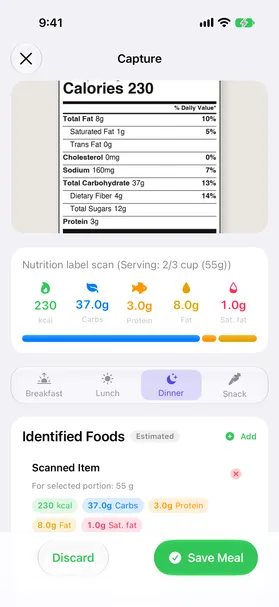

How it works
- Point the camera at the nutrition facts panel.
- Calometric reads calories, carbs, protein, fat and saturated fat on your phone.
- Check the values, set the amount and save.
Good to know
Read on your phone
The label is read on your device, so it works with no signal and the image is not sent anywhere.
Your language
Labels are read in all 17 languages the app supports. On iPhones with Apple Intelligence (iOS 27), on-device AI helps with labels the scanner cannot parse alone.
Unknown stays unknown
If a label does not list saturated fat, Calometric leaves it unknown instead of counting it as zero.
Photo scans
Label reading never uses a scan.